AI website testing for SaaS teams
Test your SaaS website with AI buyer personas.
Before you send traffic to a new page, check whether a buyer can find what they need to try your product. Barbwire sends an AI persona through your public site and records what it reads, clicks, and questions.
Test your SaaS websiteStart with a buyer and a decision.
A founder choosing a tool for four people has different questions from an IT lead approving it for 300. Give the persona a reason to visit today and a requirement it needs to check.
Paste your public URL into Barbwire to build personas from your site. Pick the one closest to the buyer you want to understand, or adapt a saved persona with a specific requirement. Start it on the page that buyer would land on.
Follow the questions across your site.
A homepage can make sense while the next page leaves a question unanswered. Use the replay to see how the persona moves between these pages.
- Homepage
Can this buyer tell whether the product fits their team?
Watch which claims they read, which examples they look for, and whether they can find a relevant next step.
- Pricing
Can they work out what they would pay?
Look for confusion about seats, usage limits, included features, or the difference between a trial and a paid plan.
- Docs and integrations
Can they check the requirement that matters to them?
A technical buyer may look for a supported framework, an integration guide, or a concrete example before trying the product.
- Security and trust
Can they find evidence they can take to an approver?
Check whether the persona finds the security information or customer evidence it needs, and which links it follows to get there.
Check the replay before changing the page.
Open the step behind a finding and inspect the screenshot. Separate what the page showed from what the persona inferred. If it missed information that was present, check how easy that information was to find.
Turn a finding into a specific task: name the page, the unanswered question, and the change you want to try. After the change, send the same saved persona from the same starting page and compare its reasoning.
Independent example · 15 October 2026
One AI buyer visits Vercel.
We configured a fictional technical cofounder, Mara, to evaluate hosting for a four-developer SaaS team. Barbwire ran a real browser visit from vercel.com through pricing and spend-management documentation. The visit took 10 steps. Vercel did not commission or endorse this example.
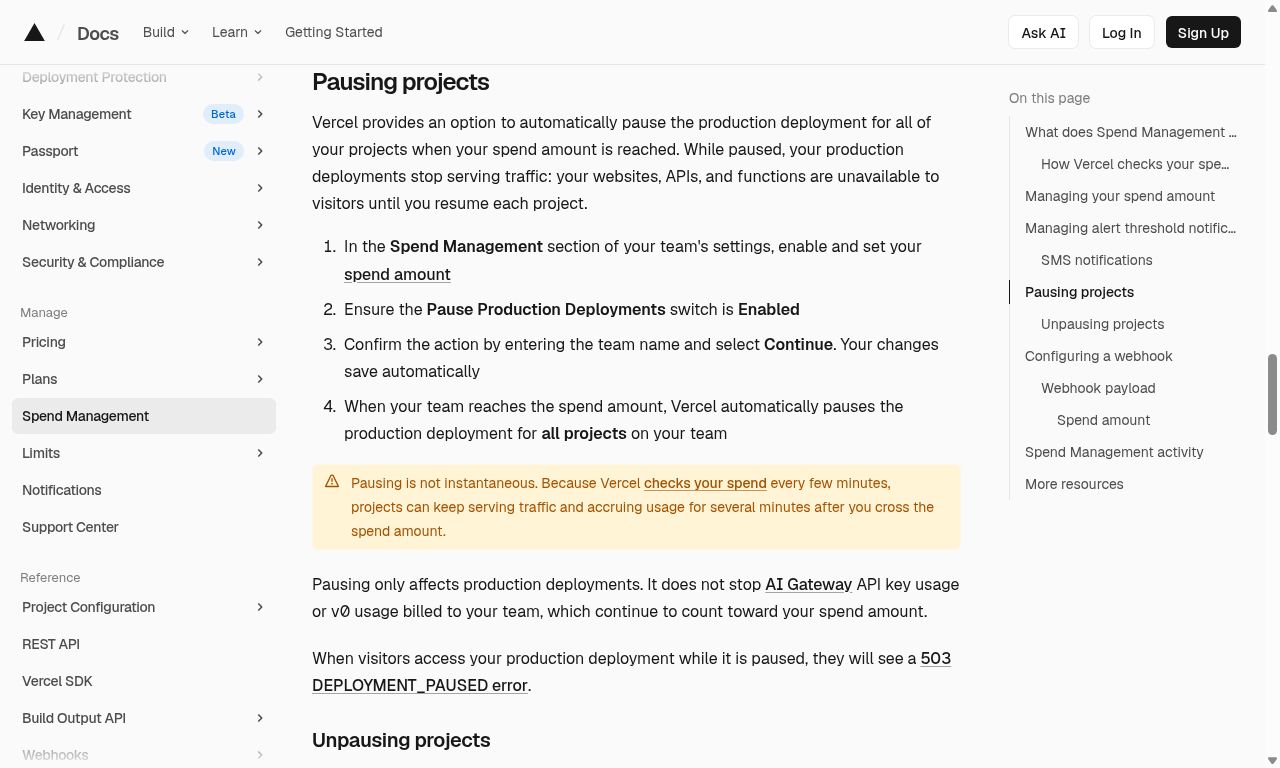
At steps 2 and 3, the pricing information and link to spending controls encouraged Mara to keep investigating. At step 6, she read that optional production pausing would interrupt customer traffic. She continued looking for an explanation of which products counted toward spending.
The model ended without choosing a trial. It had stayed on billing questions and never tested deployment. That is one simulated decision, not a verdict on Vercel or a prediction about real buyers.
The screenshot caught a model mistake.
The model later treated AI Gateway and v0 billing coverage as unanswered. But its own step 6 screenshot visibly explains that their usage continues to count toward the spend amount. We rejected that part of its conclusion. The information was present; the model failed to use it consistently.
This is why a finding needs a replay you can inspect. Check the evidence before turning an AI observation into a task. You can read the source documentation alongside the captured step.
Use the findings to plan a test with real people.
An AI persona offers a hypothesis about why someone might hesitate. Its verdict does not measure demand or predict a conversion rate. Check the important findings with customer interviews, usability sessions, or an experiment on your live site.
Barbwire reads public pages and follows links. It stops at login walls and does not type into or submit forms. Use it to review the path to a trial or demo, then test the signed-in product and form submission separately.